A Claude Desktop Alternative
That Can Still Use Claude
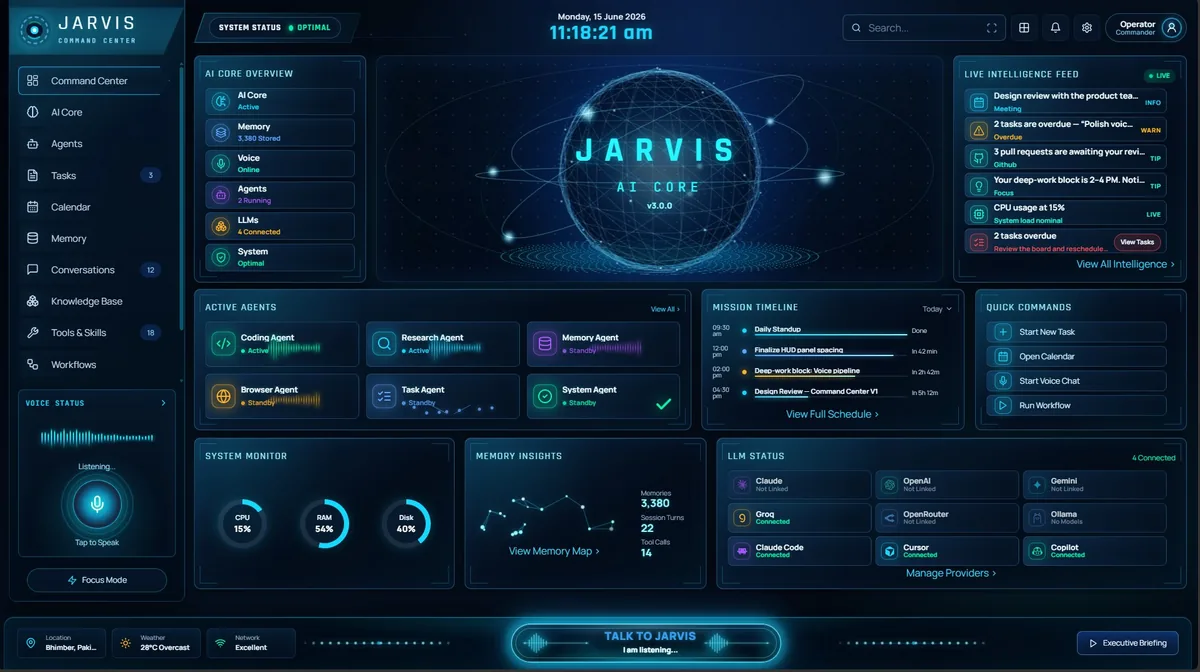
The Claude desktop app is Anthropic's own window onto Claude, and it is very good. Jarvis AI Assistant is a different kind of Windows assistant: it can run Claude models with your own key, or any of six other providers, and wraps them in local tools, voice and memory on your own disk.
Quick answer: If you like Claude but want more from a Windows desktop assistant, Jarvis AI Assistant is the alternative that does not make you give Claude up. Add your own Anthropic API key and it runs Claude models — or the Claude Code command-line tool — alongside OpenAI, Gemini, Groq, OpenRouter and local Ollama models, with 75+ built-in tools on your PC, a fully local mode, wake-word voice and an Android companion in beta. The Claude desktop app is the better fit if you want Anthropic’s polished experience with no API keys, on every platform, and are happy with Claude models only. Jarvis AI Assistant is a $9.99 one-time payment plus your own API usage; Claude Pro is $20 a month at the time of writing.
The Claude desktop app is good. So are Claude’s models.
If you are looking for a Claude desktop alternative, it is worth being clear about what you would be leaving. Anthropic’s desktop app runs on Windows 10 or later, macOS and, in beta, Linux. It is not a sealed chat box either: desktop extensions install local MCP servers “as easily as browser extensions,” in Anthropic’s words, and on paid plans Cowork can read and write files in folders you connect, asking for approval according to the permission mode you choose. Add memory on every plan and Google Workspace connectors, and it is a capable assistant.
The difference is who owns the stack. In the Claude app, Anthropic chooses the models (its own), hosts the conversation and memory, and decides which capabilities come with which plan. Jarvis AI Assistant inverts that: it is a native Windows 10 and 11 app from the Microsoft Store with its tools built in, its memory on your disk, and the model behind it chosen by you per request — and Claude is one of the choices.
Jarvis AI Assistant vs the Claude desktop app at a glance.
| Feature | Jarvis AI Assistant | Claude desktop app |
|---|---|---|
| Runs tools on your PC | 75+ local tools: shell, files, git, Docker, browser, Jira and messaging, each call logged. | Yes, within limits: local MCP servers via desktop extensions, and Cowork (paid plans) reads and writes files in folders you connect. |
| Local / offline mode | STRICT privacy mode answers with local Ollama models; nothing leaves the machine. | No offline mode; responses come from Claude models hosted by Anthropic. |
| Model choice | Seven providers per request: Claude, OpenAI, Gemini, Groq, OpenRouter, Ollama and Claude Code. | Anthropic’s Claude models only. |
| Voice | Wake-word voice over the same agent and tools. | Voice mode in beta on all plans, started from the chat window; no wake word documented. |
| Memory | Cross-session memory stored on your own disk, encrypted at rest. | Memory on all plans, stored by Anthropic; view, edit and delete topics in Settings. |
| Gmail and Google Calendar | Sends Gmail you approve; reads mail over IMAP (any provider); creates and updates Calendar events. | Google Workspace connectors: search, read, draft and send Gmail (sending asks first by default); create and update Calendar events. |
| Pricing model | $9.99 one-time for lifetime access, plus your own API keys or free local models. | Free tier; Pro is $20 per month ($17 billed annually); Max from $100 per month. |
| Platforms | Windows 10 and 11 via the Microsoft Store; Android companion in beta. | Windows 10+, macOS 11+, Linux (beta), web, iOS and Android. |
Claude details are at the time of writing (October 2026) from Anthropic’s pricing page and Help Center; plans, betas and features change often.
Pick by what you want to own.
Choose the Claude app when
- You want Claude with no API keys, no setup and one subscription.
- You move between Windows, macOS, Linux, the web and your phone with one synced history.
- You are happy with Claude models only, and with Anthropic hosting your chats and memory.
- Desktop extensions or Cowork already cover the local tools you need.
Choose Jarvis when
- You want Claude and other models side by side — and to pick per request across 7 providers.
- You need a fully local mode where nothing leaves your machine.
- You want shell, git, Docker, browser, Jira and messaging tools built in rather than assembled.
- You want hands-free wake-word voice, memory on your own disk, and a one-time price.
You do not have to choose between Claude and Jarvis.
Jarvis’s router speaks to seven providers: Claude, OpenAI, Gemini, Groq, OpenRouter, local Ollama models and the Claude Code command-line tool. Add an Anthropic API key and a claude-* prefix sends a request to Claude; switch to a local model in the same conversation when the content is sensitive. You pay each provider directly and Jarvis adds no markup on tokens.
Already paying for Claude?
Claude Code is included with Claude’s Pro, Max, Team and Enterprise plans, according to Anthropic’s pricing page. Jarvis can drive Claude Code as one of its providers, so an existing Claude plan and Jarvis work together rather than compete.
Built in versus assembled.
Both apps can act on your computer, so the honest difference is how. The Claude app gets there through extensions: you install local MCP servers from Anthropic’s directory or as packaged files, and Cowork on paid plans works with folders you connect while the session itself runs on Anthropic’s servers. That is flexible, and you choose exactly which servers to add.
Jarvis ships its 75+ tools in the box — shell, files, git, Docker, browser, Jira and messaging — and logs every call. Its three privacy modes decide what reaches a cloud model at all: STRICT keeps everything local through Ollama, GUARDED redacts API keys, passwords and personal data before any cloud call and writes an audit entry, and RELAXED turns interception off for non-sensitive work. It lives in the Windows tray with wake-word voice over the same agent, and an Android companion in beta reaches it from your phone. The security page covers each privacy mode in detail.
When the Claude desktop app is the better choice.
- You use several devices. Claude runs on Windows, macOS, Linux (beta), the web, iOS and Android; Jarvis is a Windows app with an Android companion in beta.
- You do not want to manage API keys. The Claude app works the moment you sign in, including on a free tier. Jarvis needs a provider key or a local Ollama model before it can answer.
- You want everything from one vendor. Memory, voice mode (in beta) and Google Workspace connectors are part of the Claude app, with Gmail sends asking for your approval by default.
- You prefer agentic file work with Anthropic’s guardrails. Cowork, on paid plans, brings the agent architecture behind Claude Code to your local folders without a terminal.
Not another chat box.
Most assistants talk. Jarvis executes — on your hardware, across your tools, with memory that lasts.
| Capability | ChatGPT | Microsoft Copilot | Jarvis |
|---|---|---|---|
| Has a native desktop app | |||
| Executes real tools on your machine (shell, git, docker) | partial | partial | |
| Cross-session long-term memory | partial | ||
| Multi-LLM routing (7 providers) — you pick the model | partial | ||
| Fully local / offline mode | |||
| Secret redaction before anything reaches the cloud | partial | ||
| Voice, CLI, Web & desktop — one brain | partial | partial | |
| Auditable agent core (every action logged locally) | partial | partial | |
| Bring your own API key — no markup |
Comparison reflects publicly documented capabilities at the time of writing.
Go deeper
Keep Claude. Change what surrounds it.
If you want Anthropic’s own experience on every device with no setup, the Claude desktop app is the right answer, and its extensions and Cowork make it more than a chat window. If you want a Windows assistant you control — Claude when it is the best model, another provider or a local model when it is not, tools built in, voice on a wake word and memory on your own disk — Jarvis is the better fit. Using both is reasonable too, and with an Anthropic key or Claude Code, Jarvis runs on Claude anyway.
Jarvis is available as a limited-time $9.99 one-time payment for lifetime access through the Microsoft Store, with no recurring app subscription — details on the pricing page. Install it from the Microsoft Store, add your Anthropic key or any other provider, and follow the usage guide for the first commands and routing prefixes. For the wider field, see our round-up of the best AI assistants for the Windows desktop, our ChatGPT comparison and our Copilot comparison.
Sources
- Claude: Plans and pricing
- Claude Help Center: Installing Claude Desktop
- Claude Help Center: Getting started with local MCP servers on Claude Desktop
- Claude Help Center: Get started with Cowork
- Claude Help Center: Use Google Workspace connectors
- Claude Help Center: Chat search and memory
- Claude Help Center: Use voice mode